01 ONE PLACE FOR THE DATA
Each figure is entered once and flows everywhere it is needed. No more retyping between workbooks and lists.
SYSTEMS
Many businesses run on a collection of workbooks, old lists and manual steps that grew up over the years. Often only one person really understands how they fit together.
When that person is off, or leaves, the risk becomes real. We replace the collection with one robust system you own, checked against your old figures to the pound.
See it explained
SOUND FAMILIAR?
One of these is usually enough:
If the person who holds it all together left tomorrow, would anyone else know how it works?
BEFORE AND AFTER
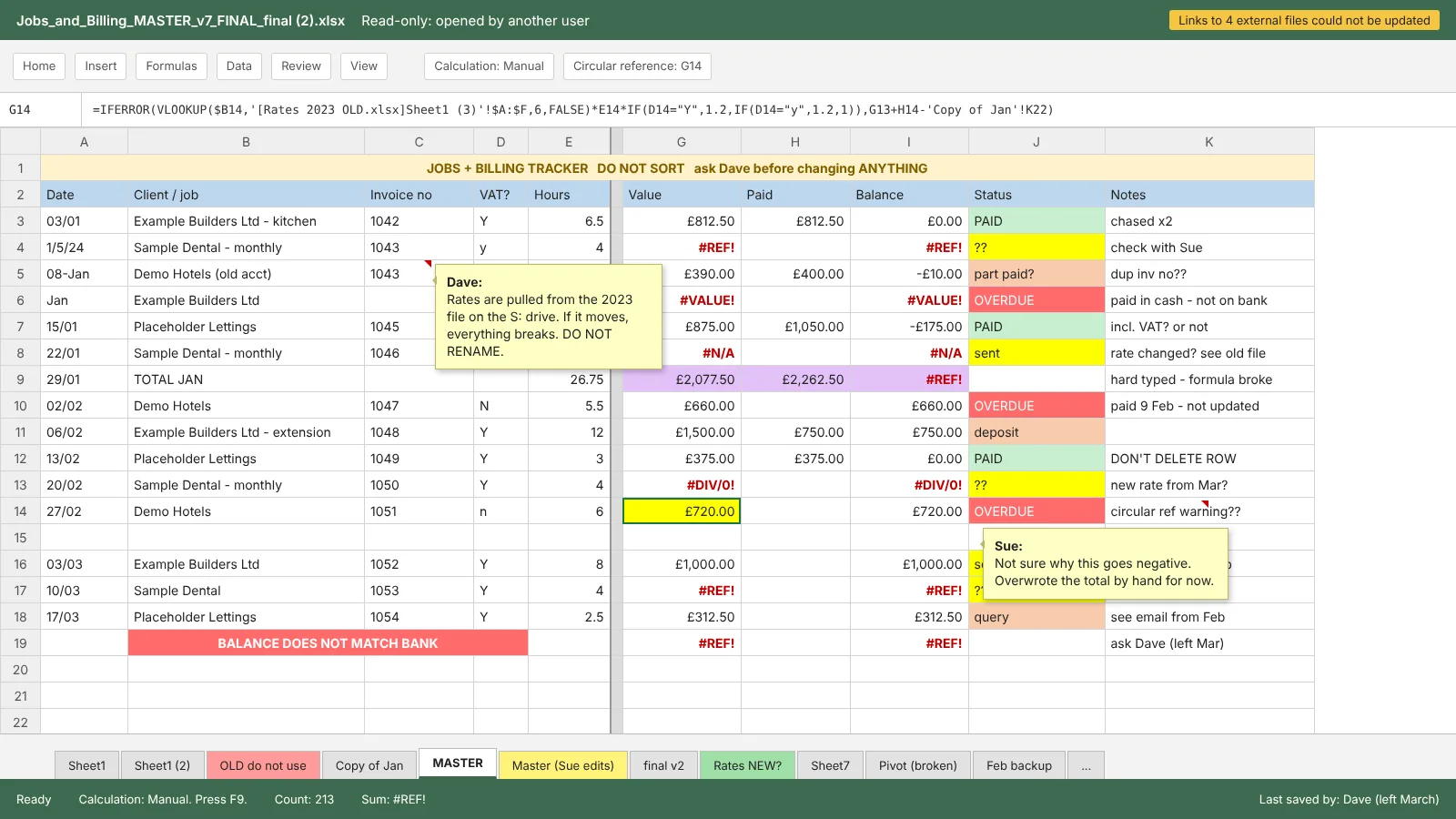
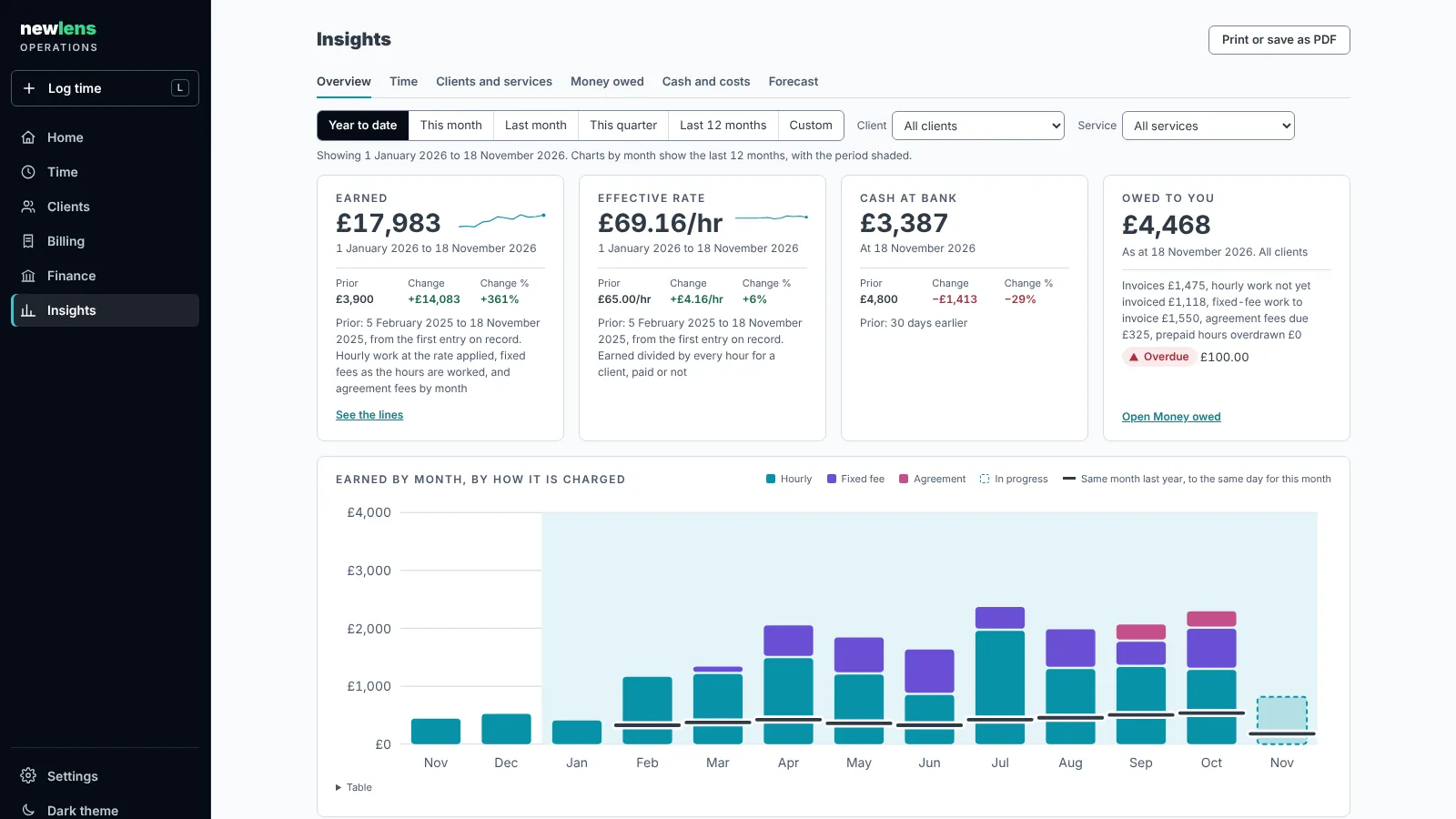
WHAT A SYSTEM CAN DO
01 ONE PLACE FOR THE DATA
Each figure is entered once and flows everywhere it is needed. No more retyping between workbooks and lists.
02 RULES THAT HOLD
The checks your workbooks relied on are built in. A wrong entry is refused when it is made, not found at month end.
03 DOCUMENTS AT A CLICK
Invoices, statements and reports produced from the data, the same way every time.
04 REPORTING YOU CAN TRUST
Dashboards, analytics and forecasts drawn from one definition of each figure, so every view agrees.
05 SAFE BY DEFAULT
Nightly backups, a record of who changed what, and a tested way back if something goes wrong.
06 READY FOR AI
An optional connector lets your AI assistant read and add records, within permissions you set.
READY FOR AI
Every system can include a secure AI connector built on MCP, the Model Context Protocol. It is the open standard that lets assistants such as Claude work directly with business systems, so nobody has to copy and paste between the two.
Hand it a bank statement and ask it to add the month's payments. It lists what it will record, and records it only when you agree.
An AI assistant processes what it reads, so we set out where that happens for you to decide before the connector is switched on.
HOW IT WORKS
01 INTRODUCTORY CALL
No charge. We work out together whether this route fits.
02 REVIEW
We map what your workbooks, lists and processes really do, write down their rules and rate the risks. You keep the documentation whatever you decide. Sometimes the honest answer is to tidy and document what you already have.
03 BUILD IN STAGES
A fixed price for each stage, and you approve each one before the next begins. Your existing records are imported and checked against the old figures to the pound before anything goes live.
04 HANDOVER AND SUPPORT
Full documentation and step-by-step guides as standard. An optional monthly agreement keeps it backed up, monitored and improving.
CASE STUDY
newlens ran on three spreadsheets: a time log, a cashbook and an invoice master. They were well kept, but they did not talk to each other. Payments were typed twice. An invoice could look overdue after it had been paid. Every January, the history started again.
We replaced all three with one system, using the same method we now offer.
THREE INTO ONE
Time, billing and cash in a single ledger, from the hour worked to the bank line that paid for it.
RECONCILED TO THE POUND
All of the year's records imported and checked against the spreadsheets, with nothing left unexplained.
EVERY DECISION WRITTEN DOWN
More than a hundred design decisions recorded with the reasoning behind each, and around three hundred automated tests.
DOES THE ROUTINE WORK
Invoices, statements, analytics, forecasting and nightly backups, with an AI connector that enters a month of bank lines from a statement.
WHAT YOU KEEP
01 YOUR SYSTEM
It runs in your own Microsoft 365 or cloud account, in your name, and you pay its running costs directly.
02 YOUR DATA
Held in a UK region and never transferred to or stored on any system newlens owns, controls or contracts.
03 NO LOCK-IN
The code, documentation and guides are yours, written so that any competent developer could work on them.
SECURITY IN PLAIN WORDS
WHEN THIS IS NOT THE ROUTE
This route is for tools your own team uses every day. It is not for public websites or consumer apps, taking card payments, or replacing your accounts package or ERP.
If your workbooks only need tidying and documenting, we will say so on the call. If the work is bigger, the bespoke route may fit better.
COMMON QUESTIONS
Yes. That is often where we start. We work out what the workbooks do from their formulas and data, write it down, and confirm it with the people who use it every day.
No. You own the system, the code and the documentation. Each system is written and documented so that any competent developer could support it.
AI-assisted engineering speeds up the build. A named person makes every decision, approves every stage and is accountable for the result. The business rules are written down and covered by automated tests.
The Model Context Protocol is an open standard for connecting AI assistants to business systems. It lets an assistant work with your records within the permissions you set, rather than you copying and pasting between the two.
The review and each build stage are scoped after the introductory call and quoted in writing. Running costs are cloud charges, paid directly by you.
It is the simplest route, because sign-in and security come with it. Other setups can be discussed on the call.
START HERE
Thirty minutes, no charge, no pitch. We will tell you honestly whether a system is the right answer.